We recently had the pleasure of hosting Andrey Cheptsov, the author and core contributor to dstack, for a fascinating overview of this powerful new open-source orchestrator. You can watch the full talk here. Andrey detailed how dstack is built specifically to address the unique challenges ML engineers and researchers face when working with GPUs, offering a simpler and more GPU-native alternative to like Kubernetes and Slurm.
If you're tired of wrestling with complex infrastructure just to schedule and provision your GPU workloads, read on to learn how dstack simplifies GPU provisioning, development, training, and inference.
1: The need for GPU-native orchestration
dstack is a new kind of orchestrator, distinguishing itself by being GPU-centric. While legacy orchestrators, such as Kubernetes and Slurm, are essential tools, they often have gaps when it comes to optimally supporting GPUs. dstack aims to fill these gaps by providing out-of-the-box experience and an interface tailored specifically for ML-related tasks, including training, development, and inference.
The core promise of dstack is simplicity and no vendor lock-in: If your code runs on your machine via SSH, it should work through dstack without requiring any changes. dstack’s primary function is to automate the provisioning of GPUs and workload orchestration.

2: Architecture: control plane, backends, and fleets
The dstack system is managed by the dstack Server, also referred to as the Control Plane. This central component stores the state and serves as the source of truth for all operations. Users interact with the server via a CLI (Command Line Interface) or API, and the server handles the orchestration of all workloads, including provisioning cloud GPUs.
The system abstracts the underlying complexity, supporting computation across multiple types of infrastructure (backends):
- Cloud Providers: This includes hyperscalers and “neoclouds” that offer both Nvidia and AMD GPUs.
- Kubernetes Clusters: dstack can connect to managed or on-prem Kubernetes clusters, delegating provisioning to Kubernetes once connected via the kubeconfig.
- On-Premises (Bare Metal): dstack can directly manage on-premises resources via SSH fleets.
Work within dstack is organized using Projects, allowing teams to partition their work into isolated units, each potentially having different compute resources and different members.
3: Abstractions: Dev Environments, Tasks, Services
Using dstack primarily involves defining a configuration and then running the
dstack apply
command. dstack’s essential abstractions map directly to the most common ML use cases:
1. Dev environments (experimentation)
This is the most "primitive" way to use dstack, designed for when researchers need to access a machine with GPUs through their desktop IDE. Configurations define the type (dev environment), the Docker image or Python version, the IDE to use, and, crucially, the required GPU resources.
dstack adds intelligent utilization policies here: it can automatically kill a dev environment if it detects that the GPU is not being used, or if a specified inactivity duration is exceeded (e.g., if a user closes their laptop and forgets about the session).
2. Tasks (training & batch jobs)
Tasks are designed for long-running, heavyweight jobs such as model training, fine-tuning, batch evaluation, or batch inference. Tasks allow users to specify commands—exactly what needs to run.
For distributed training (running on multiple nodes), dstack uses system environment variables
(prefixed with dst_underscore) to propagate necessary information, such as the number
of GPUs per node, the world size, and the master node’s IP address. This ensures compatibility with
any distributed framework, such as Torch run, as dstack provides the expected connectivity and
resources.
3. Services (model inference)
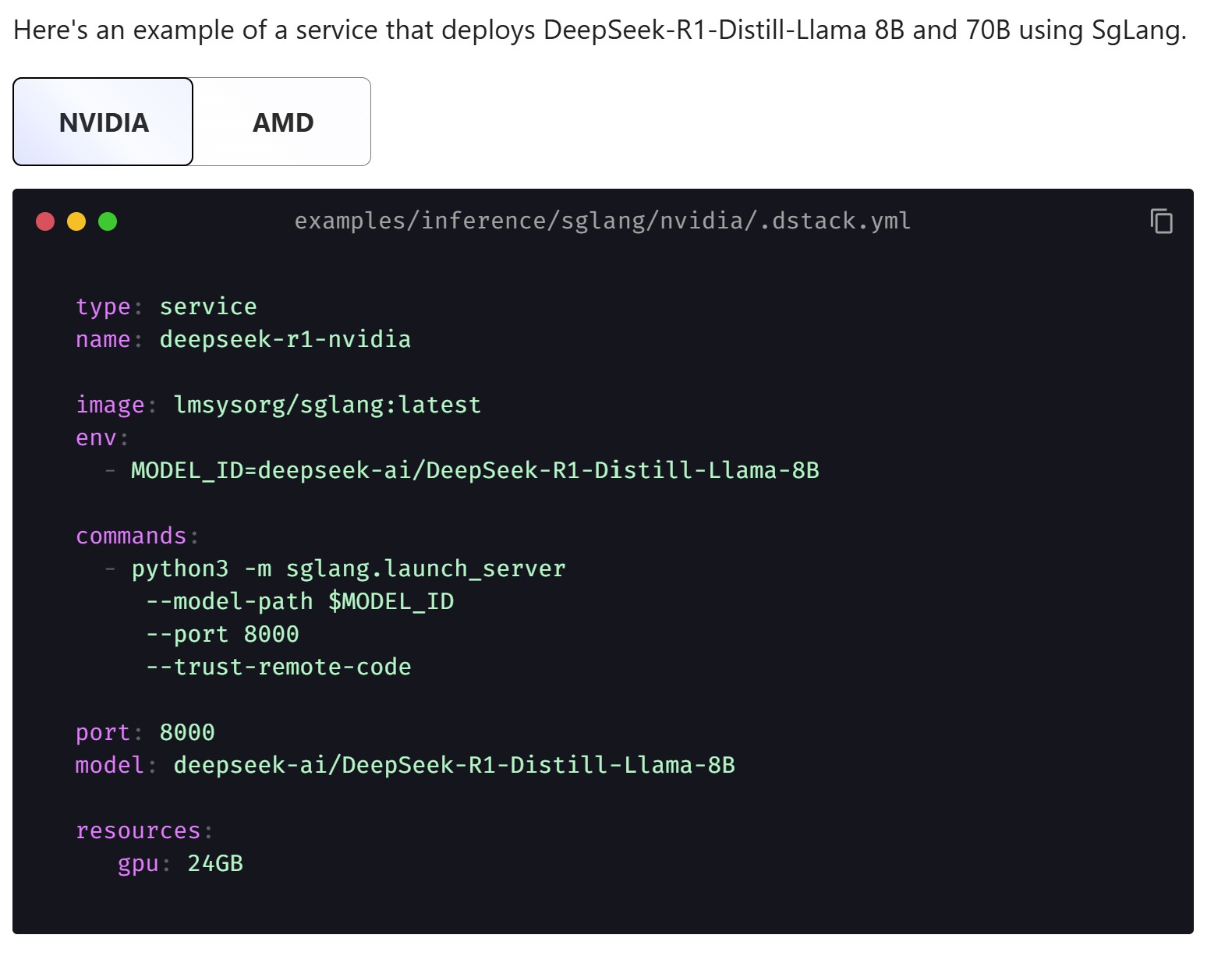
For deploying models for production-grade inference, the configuration type is set to service. Services allow users to define commands, specify the endpoint, and configure autoscaling using a defined range of replicas (e.g., scaling from one to four instances) and specific rules. For advanced ingress handling and production deployment, users can also define and create a Gateway. Recently dstack announced SGLang Router support for optimized inference.
4: Fleets: GPU provisioning and cluster management
dstack manages compute resources through the concept of Fleets.
- Backend Fleets: These are dynamically and automatically provisioned through the configured cloud backends. A user can define a fixed number of nodes or a range (e.g., zero to ten nodes), and dstack provisions resources on demand. Supported providers include AWS, Azure, GCP, Lambda, Nebius, Vultr, CUDO, OCI, DataCrunch, AMD Developer Cloud, Digital Ocean, Hot Aisle, CloudRift, Runpod, and Vast.ai.
- SSH Fleets: For on-prem bare-metal servers, users list hostnames and SSH credentials. dstack automatically connects to the cluster, detects the hardware, and makes it available for workloads.
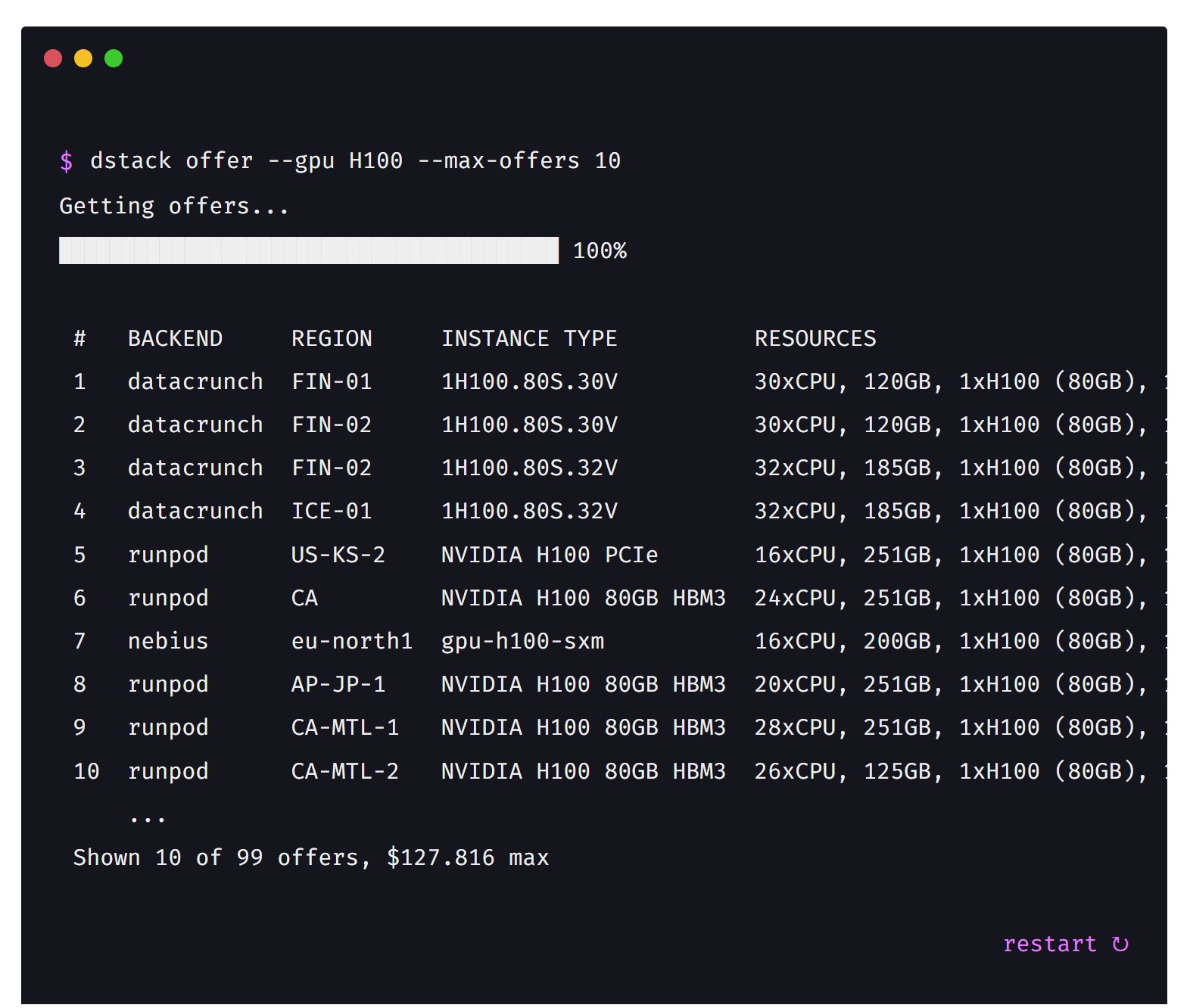
A notable feature related to hardware utilization is Blocks. By default, dstack might only allocate a host if all GPUs are being used (if the machine is expensive). However, by setting the blocks property, teams can specify how many concurrent workloads are allowed to run on a single host, enabling finer-grained utilization of GPUs (e.g., allowing multiple workloads to share an 8-GPU host).
For more advanced setups, dstack supports Clusters. A cluster is a fleet with its placement set to cluster. This configuration ensures that the instances within the fleet are interconnected, enabling fast inter-node communication—crucial for tasks such as efficient distributed training.
5: Operational efficiency
Beyond core orchestration, dstack includes numerous features aimed at operational robustness:
- Metrics & Health: dstack collects metrics, detects GPU health (using tools like DCGM), and can export this data to Prometheus.
- Security: dstack supports centralized management and encryption of sensitive data through Secrets. The dstack team is actively exploring more advanced security and confidential orchestration, including decentralized approaches and integration with technologies like ZK (Zero Knowledge) and solutions from companies like Tinfoil and Fale.
- Scalability: For managing large clusters, the dstack Server (Control Plane) can be run in multiple replicas, utilizing PostgreSQL to store the state and ensure reliability and scalability.
- Dynamic Scheduling: While dynamic resource allocation is currently available for services based on load, the dstack team is actively interested in co-designing native features for reinforcement learning (RL). RL training often differs significantly from simple inference, and dstack is open to enhancing its interface to handle the dynamic resource needs of RL effectively.
dstack is an open-source project and welcomes user feedback and contribution. With frequent releases, the project is evolving rapidly to provide the most efficient, GPU-optimized interface for machine learning infrastructure.
Talk Resources
About This Talk
This talk was presented by Andrey Cheptsov and hosted by Daniel Kang as part of AER Labs' technical discussion series.
Blog summary written by Shubham Agrawal. Original speaker owns the rights to the content.